Usage
A Table is a tkinter.Widget. Its cells are usually stored in
an ArrayVar, a Tcl array keyed by "row,col" indices. The keyword
arguments of Table are the options of the Tcl widget, without the leading
- (e.g. rows, cols, variable, titlerows). See the
Tktable manual for all of them.
Example
examples/planets.py shows the
8 planets of the Solar System, from NASA’s Planetary Fact Sheet, in an editable table:
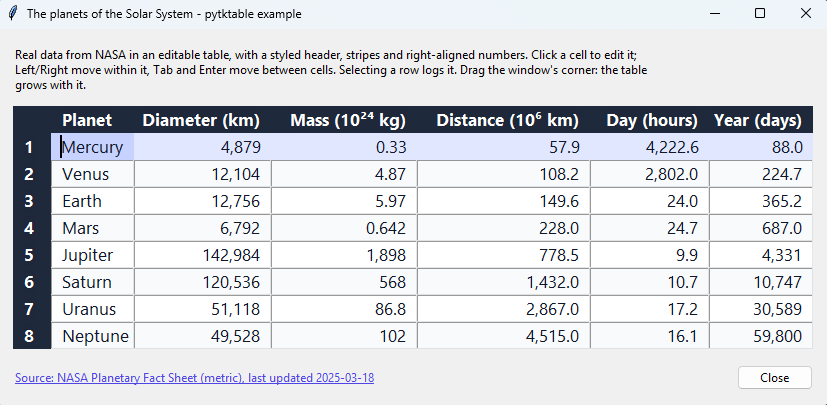
The screenshot was taken on Windows 11; the window looks native on each OS.
To run it without installing Tktable, use Docker: see the instructions for Linux and Windows.
"""The 8 planets of the Solar System, from NASA's Planetary Fact Sheet, in an editable table.

Shows titles, an ArrayVar, column widths, tags, callbacks and key bindings. The data is in
examples/data/planets.json, so the example works offline; to refresh it, run
``poetry run poe update_example_data``.

Needs Tktable installed (check with ``python -m tktable``). Run it from the repository's root:

    poetry run python -m examples.planets

To run it in Docker instead, without installing Tktable, see
https://nbro.github.io/tktable/usage.html

Selecting a row logs it. Click a cell to edit it. Pass ``-test`` to close the window after a
second.
"""

import json
import logging
import tkinter
import webbrowser
from pathlib import Path
from tkinter import font, ttk

from examples.window import create_window, run
from tktable import ArrayVar, Table

logger = logging.getLogger(__name__)

DATA_FILE = Path(__file__).with_name("data") / "planets.json"

DESCRIPTION = (
    "Real data from NASA in an editable table, with a styled header, stripes and right-aligned "
    "numbers. Click a cell to edit it; Left/Right move within it, Tab and Enter move between "
    "cells. Selecting a row logs it. Drag the window's corner: the table grows with it."
)

# The table's columns: title, key in planets.json, and how to format the values.
# Distance is from the Sun, Day and Year are the length of a day and an orbit, Temp. is the mean.
COLUMNS = (
    ("Planet", "name", "{}"),
    ("Diameter (km)", "diameter_km", "{:,}"),
    ("Mass (10^24 kg)", "mass_1e24_kg", "{:,}"),
    ("Distance (10^6 km)", "distance_from_sun_1e6_km", "{:,}"),
    ("Day (hours)", "day_hours", "{:,}"),
    ("Year (days)", "year_days", "{:,}"),
    ("Moons", "moons", "{}"),
    ("Temp. (°C)", "mean_temperature_c", "{}"),
)

# Colors (from the Tailwind CSS palette): a slate header, light stripes, an indigo selection.
HEADER_BG, HEADER_FG = "#1e293b", "#ffffff"
STRIPE_BG = "#f8fafc"
SELECTION_BG, ACTIVE_BG, TEXT_FG = "#e0e7ff", "#c7d2fe", "#0f172a"
LINK_FG = "#4f46e5"

# Space inside each cell, around its text, in pixels.
CELL_PADX, CELL_PADY = 10, 6

# Pixels between a cell's left border and its text: the border and default padding, plus ours.
TEXT_PADDING = 3 + CELL_PADX


def load_data() -> dict:
    """Read the planets' data and its source from planets.json."""
    return json.loads(DATA_FILE.read_text(encoding="utf-8"))


def fill_cells(cells: ArrayVar, planets: list[dict]) -> None:
    """Put the titles in title row -1, row numbers in title column -1, and the planets."""
    for col, (title, _key, _format) in enumerate(COLUMNS):
        cells[f"-1,{col}"] = title

    for row, planet in enumerate(planets):
        cells[f"{row},-1"] = str(row + 1)
        for col, (_title, key, value_format) in enumerate(COLUMNS):
            cells[f"{row},{col}"] = value_format.format(planet[key])


def style_table(
    table: Table, cells: ArrayVar, cell_font: font.Font, header_font: font.Font
) -> None:
    """Size the columns to their content, add stripes, right-align numbers, and set the colors."""
    rows, cols = int(table.cget("rows")) - 1, int(table.cget("cols")) - 1
    widths = {"-1": 4}
    for col in range(cols):
        longest = max(len(str(cells[f"{row},{col}"])) for row in range(-1, rows))
        widths[str(col)] = longest + 2
    table.width(**widths)

    table.tag_configure("stripe", background=STRIPE_BG)
    table.tag_row("stripe", *range(1, rows, 2))

    table.tag_configure("number", anchor="e")
    table.tag_col("number", *range(1, cols))

    table.tag_configure(
        "title", background=HEADER_BG, foreground=HEADER_FG, relief="flat", font=header_font
    )
    # The edited cell is drawn with the "active" tag, which needs the font and alignment too:
    # otherwise its text uses Tktable's default (smaller) font, aligned to the top.
    table.tag_configure("sel", background=SELECTION_BG, foreground=TEXT_FG, font=cell_font)
    table.tag_configure(
        "active", background=ACTIVE_BG, foreground=TEXT_FG, font=cell_font, anchor="w"
    )


def add_spreadsheet_keys(table: Table, cell_font: font.Font) -> None:
    """Make editing feel like a spreadsheet.

    - Left/Right move the cursor within the cell (Tktable's default moves to the next cell).
    - Tab/Shift+Tab move to the next/previous cell; Enter moves to the cell below.
    - A click puts the cursor where you click (Tktable's default puts it at the end).

    Each handler returns "break" to stop Tktable's own binding for the same key.
    """
    # Rows and columns start at -1 (the titles), so the last index is the count minus 2.
    last_row, last_col = int(table.cget("rows")) - 2, int(table.cget("cols")) - 2

    def active_cell() -> tuple[int, int] | None:
        try:
            return table.index("active", "row"), table.index("active", "col")
        except tkinter.TclError:  # No active cell, e.g. after clicking a title.
            return None

    def go_to(row: int, col: int) -> str:
        table.activate(f"{row},{col}")
        table.see("active")
        return "break"

    def move_cursor(step: int) -> str:
        text = str(table.curvalue())
        position = int(str(table.icursor())) + step
        table.icursor(min(max(position, 0), len(text)))
        return "break"

    def next_cell(_event: tkinter.Event) -> str:
        cell = active_cell()
        if cell is None:
            return "break"
        row, col = cell
        if col < last_col:
            return go_to(row, col + 1)
        return go_to(row + 1, 0) if row < last_row else "break"

    def previous_cell(_event: tkinter.Event) -> str:
        cell = active_cell()
        if cell is None:
            return "break"
        row, col = cell
        if col > 0:
            return go_to(row, col - 1)
        return go_to(row - 1, last_col) if row > 0 else "break"

    def cell_below(_event: tkinter.Event) -> str:
        cell = active_cell()
        if cell is None or cell[0] == last_row:
            return "break"
        return go_to(cell[0] + 1, cell[1])

    def place_cursor(x: int) -> None:
        if active_cell() is None:
            return
        cell_left = table.bbox("active")[0]
        text = str(table.curvalue())
        widths = [cell_font.measure(text[:i]) for i in range(len(text) + 1)]
        clicked = x - cell_left - TEXT_PADDING
        table.icursor(min(range(len(widths)), key=lambda i: abs(widths[i] - clicked)))

    table.bind("<Left>", lambda _event: move_cursor(-1))
    table.bind("<Right>", lambda _event: move_cursor(1))
    table.bind("<Tab>", next_cell)
    table.bind("<Shift-Tab>", previous_cell)
    table.bind("<Return>", cell_below)
    table.bind("<KP_Enter>", cell_below)
    # after_idle: run once Tk has finished handling the click, so Tktable can't undo it.
    table.bind("<ButtonRelease-1>", lambda event: table.after_idle(place_cursor, event.x))


def add_link(parent: tkinter.Misc, text: str, url: str) -> ttk.Label:
    """Return a label that looks like a link and opens url in the browser when clicked."""
    link_font = font.nametofont("TkDefaultFont").copy()
    link_font.configure(underline=True)

    link = ttk.Label(parent, text=text, foreground=LINK_FG, font=link_font, cursor="hand2")
    link.font = link_font  # Keep a reference: Tk deletes unreferenced fonts.
    link.bind("<Button-1>", lambda _event: webbrowser.open(url))
    return link


def main() -> None:
    """Create the window with the table, the data's source, and a Close button."""
    root, frame = create_window("The planets of the Solar System", DESCRIPTION)

    # Larger versions of the default font. Keep references: Tk deletes unreferenced fonts.
    cell_font = font.nametofont("TkDefaultFont").copy()
    cell_font.configure(size=13)
    header_font = cell_font.copy()
    header_font.configure(weight="bold")

    data = load_data()
    planets = data["planets"]
    cells = ArrayVar(root)
    fill_cells(cells, planets)

    def on_select(event: tkinter.Event) -> None:
        if event.r >= 0:  # Row -1 is the title row.
            logger.info("Selected %s", cells[f"{event.r},0"])

    footer = ttk.Frame(frame)
    footer.pack(side="bottom", fill="x", pady=(16, 0))
    source = f"Source: {data['source']}, last updated {data['source_last_updated']}"
    add_link(footer, source, data["source_url"]).pack(side="left")
    ttk.Button(footer, text="Close", command=root.destroy).pack(side="right")

    table = Table(
        frame,
        rows=len(planets) + 1,
        cols=len(COLUMNS) + 1,
        titlerows=1,
        titlecols=1,
        roworigin=-1,
        colorigin=-1,
        height=len(planets) + 1,
        selectmode="browse",
        selecttype="row",
        rowstretch="all",
        colstretch="all",
        anchor="w",
        font=cell_font,
        background="#ffffff",
        foreground=TEXT_FG,
        highlightthickness=0,
        ipadx=CELL_PADX,
        ipady=CELL_PADY,
        variable=cells,
        browsecommand=on_select,
    )
    table.pack(expand=True, fill="both")
    style_table(table, cells, cell_font, header_font)

    add_spreadsheet_keys(table, cell_font)

    run(root)


if __name__ == "__main__":
    logging.basicConfig(level=logging.INFO)
    main()
Callbacks
Callbacks such as command, browsecommand and validatecommand receive a
TableEvent, with these attributes (the Tcl %-substitutions):
Attribute |
Meaning |
|---|---|
|
row and column of the cell |
|
the index |
|
1 if the cell is being written to, 0 if read |
|
the current and new value |
|
the widget |
More examples
Each of these small examples shows one feature. Run one from the repository’s root, e.g.
poetry run python -m examples.tags. CI runs all of them, so they are known to work.
Example |
Shows |
|---|---|
Cell values computed on demand by a callback ( |
|
Styling cells, rows, columns and individual title cells with tags, and tag priority |
|
Merged cells ( |
|
Buttons and checkboxes inside cells ( |
|
Rows and columns resizable with the mouse ( |
|
Selecting cells, rows or columns, and |
|
Inserting and deleting rows and columns |
|
Cells that flash when their value changes, with a custom color ( |
|
Rejecting invalid edits ( |